
It's all a blur
Designing a slightly sneaky blur filter and then poking holes in it.
If you follow information security discussions on the internet, you might have heard that blurring an image is not a good way of redacting its contents. This is supposedly because blurring algorithms are reversible.
But then, it’s not wrong to scratch your head. Blurring amounts to averaging the underlying pixel values. If you average two numbers, there’s no way of knowing if you’ve started with 1 + 5 or 3 + 3. In both cases, the arithmetic mean is the same and the original information appears to be lost. So, is the advice wrong?
Well, yes and no! There are ways to achieve non-reversible blurring using deterministic algorithms. That said, in some cases, blur filters can preserve far more information than would appear to the naked eye — and do so in a pretty unexpected way. In today’s article, we’ll build a rudimentary blur algorithm and then pick it apart.
One-dimensional moving average
If blurring is the same as averaging, then the simplest algorithm we can choose is a single-axis moving mean. In photo editing software, this filter is commonly called motion blur and is fairly similar to the artifacts produced by rapid object movement or camera shake.
To implement the effect, we take a fixed-size window and replace each pixel value with the arithmetic mean of n pixels in its neighborhood. For n = 5, the process is shown below:
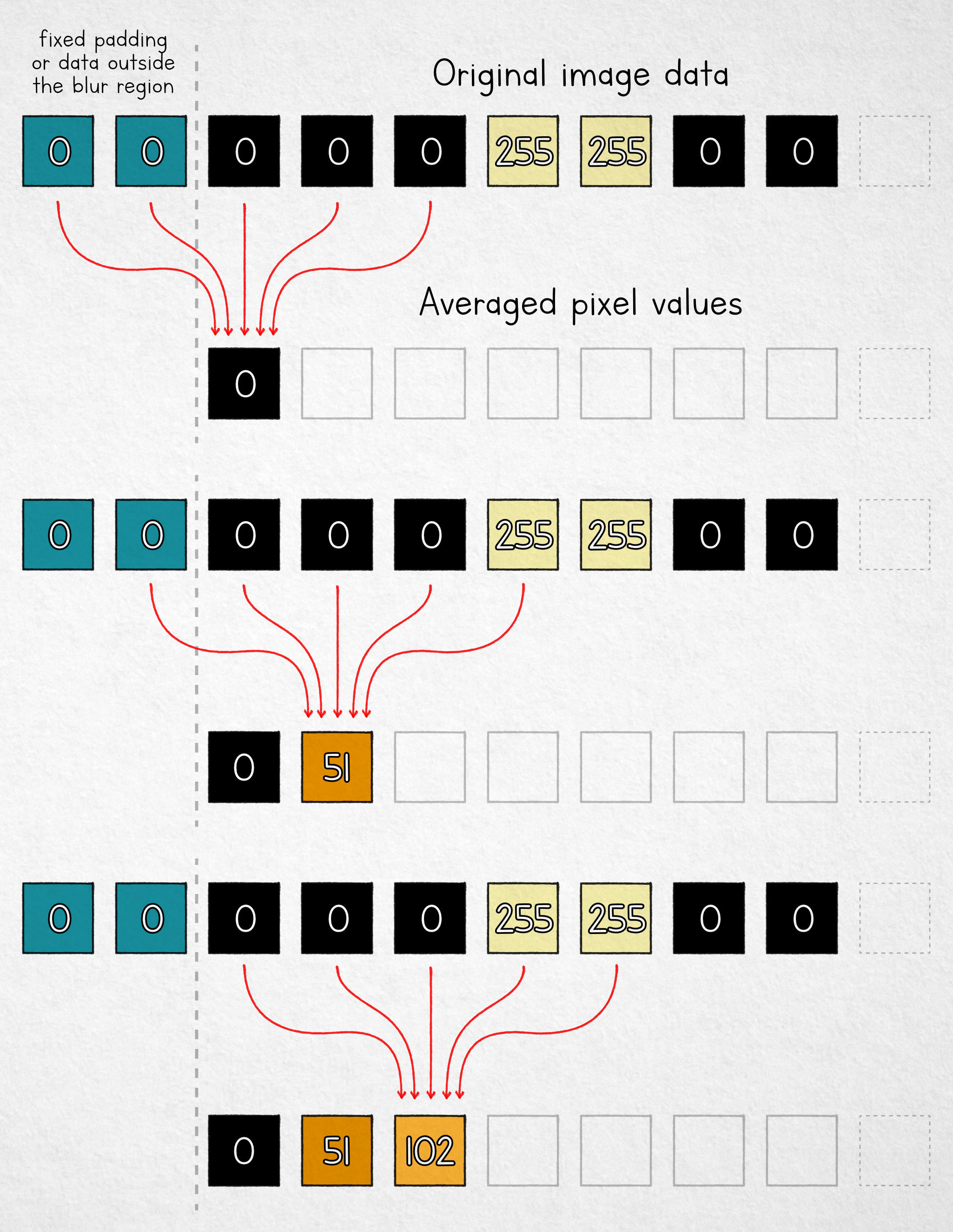
Note that for the first two cells, we don’t have enough pixels in the input buffer. We can use fixed padding, “borrow” some available pixels from outside the selection area, or simply average fewer values near the boundary. Either way, the analysis doesn’t change much: the presence of this boundary, along with the discrete stepover of the averaging window, leaks information about the underlying image.
To illustrate, let’s assume that we’ve completed the blurring process and no longer have the original pixel values. To reconstruct the data, we start at the left boundary (x = 0). Recall that we calculated the first blurred pixel like by averaging the following pixels in the original image:
Next, let’s have a look at the blurred pixel at x = 1. Its value is the average of:
We can easily turn these averages into sums by multiplying both sides by the number of averaged elements (5):
Note that the underlined terms repeat in both expressions; this means that if we subtract the expressions from each other, we end up with just:
The value of img(-2) is known to us: it’s one of the fixed padding pixels used by the algorithm. Let’s shorten it to c. We also know the values of blur(0) and blur(1): these are the blurred pixels that can be found in the output image. This means that we can rearrange the equation to recover the original input pixel corresponding to img(3):
We can also apply the same reasoning to the next pixel:
At this point, we seemingly hit a wall with our five-pixel average, but the knowledge of img(3) allows us to repeat the same analysis for the blur(5) / blur(6) pair a bit further down the line:
This nets us another original pixel value, img(8). From the earlier step, we also know the value of img(4), so we can find img(9) in a similar way. This process can continue to successively reconstruct additional pixels, although we end up with some gaps. For example, following the calculations outlined above, we still don’t know the value of img(0) or img(1).
These gaps can be resolved with a second pass that moves in the opposite direction in the image buffer. That said, instead of going down that path, we can also make the math a bit more tidy with a harmless, good-faith tweak to the averaging algorithm in a way that doesn’t change the nature of the effect.
Right-aligned moving average
The modification that will make our life easier is to shift the averaging window so that one of its ends is aligned with where the computed value will be stored:
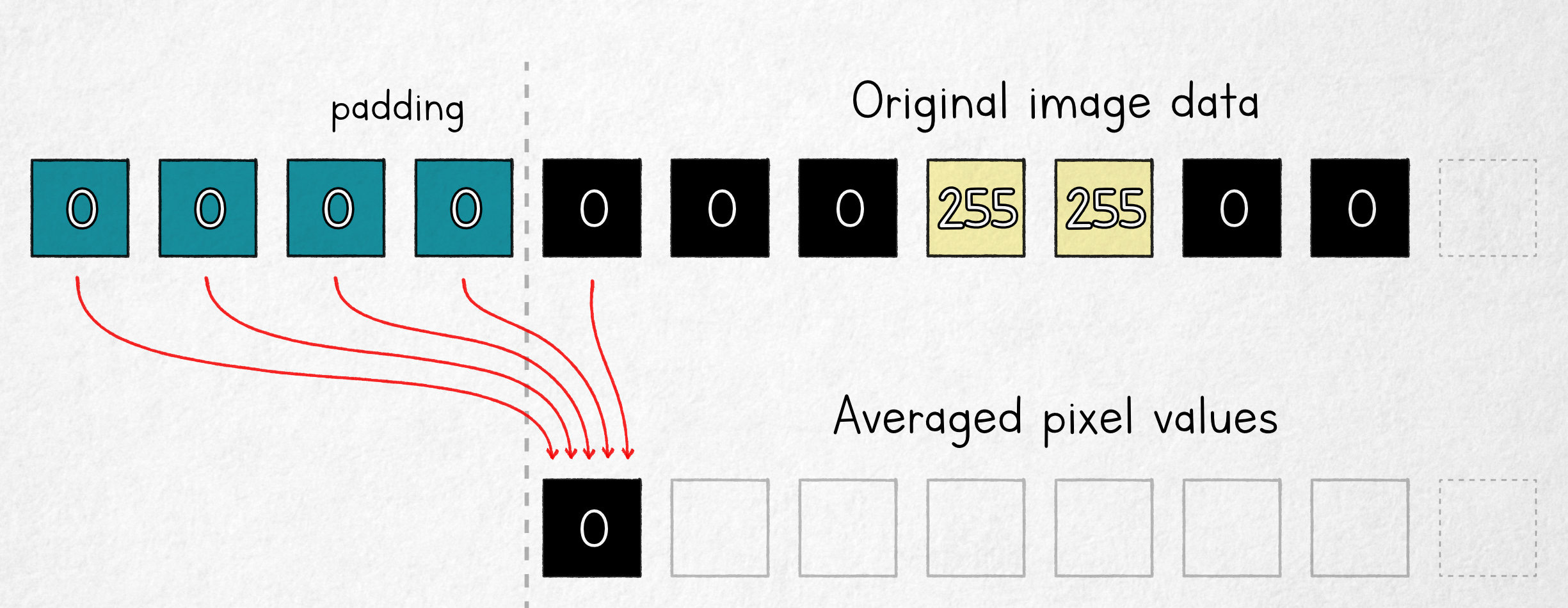
In this model, the first output value is an average of four fixed padding pixels (c) and one original image pixel; it follows that in the n = 5 scenario, the underlying pixel value can be computed as:
If we know img(0), we now have all but one of the values that make up blur(1), so we can find img(1):
The process can be continued iteratively, reconstructing the entire image — this time, without any discontinuities and without the need for a second pass.
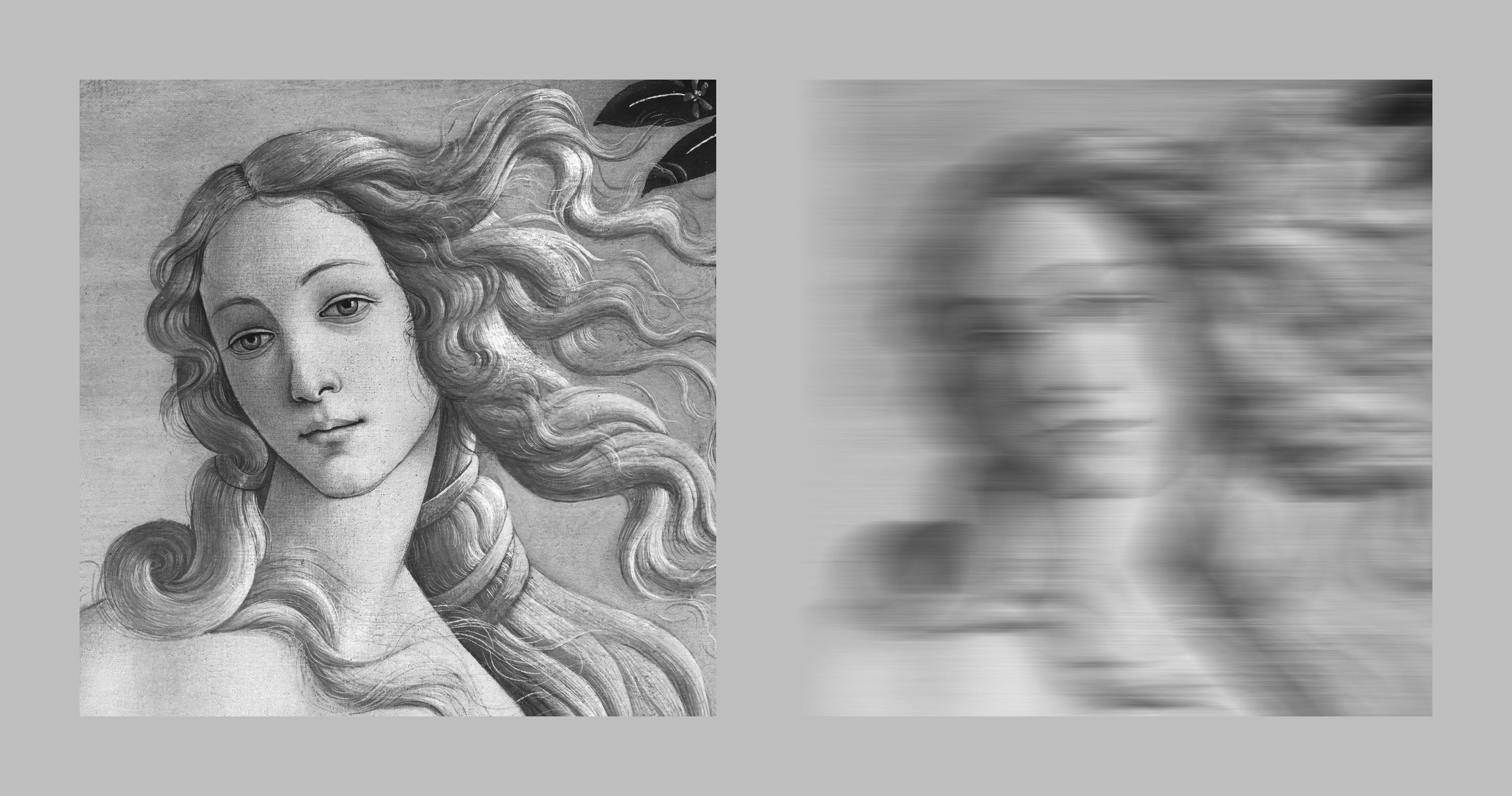
In the illustration below, the left panel shows a detail of The Birth of Venus by Sandro Botticelli; the right panel is the same image ran through the right-aligned moving average blur algorithm with a 151-pixel averaging window that moves only in the x direction:
Now, let’s take the blurry image and attempt the reconstruction method outlined above — computer, ENHANCE!
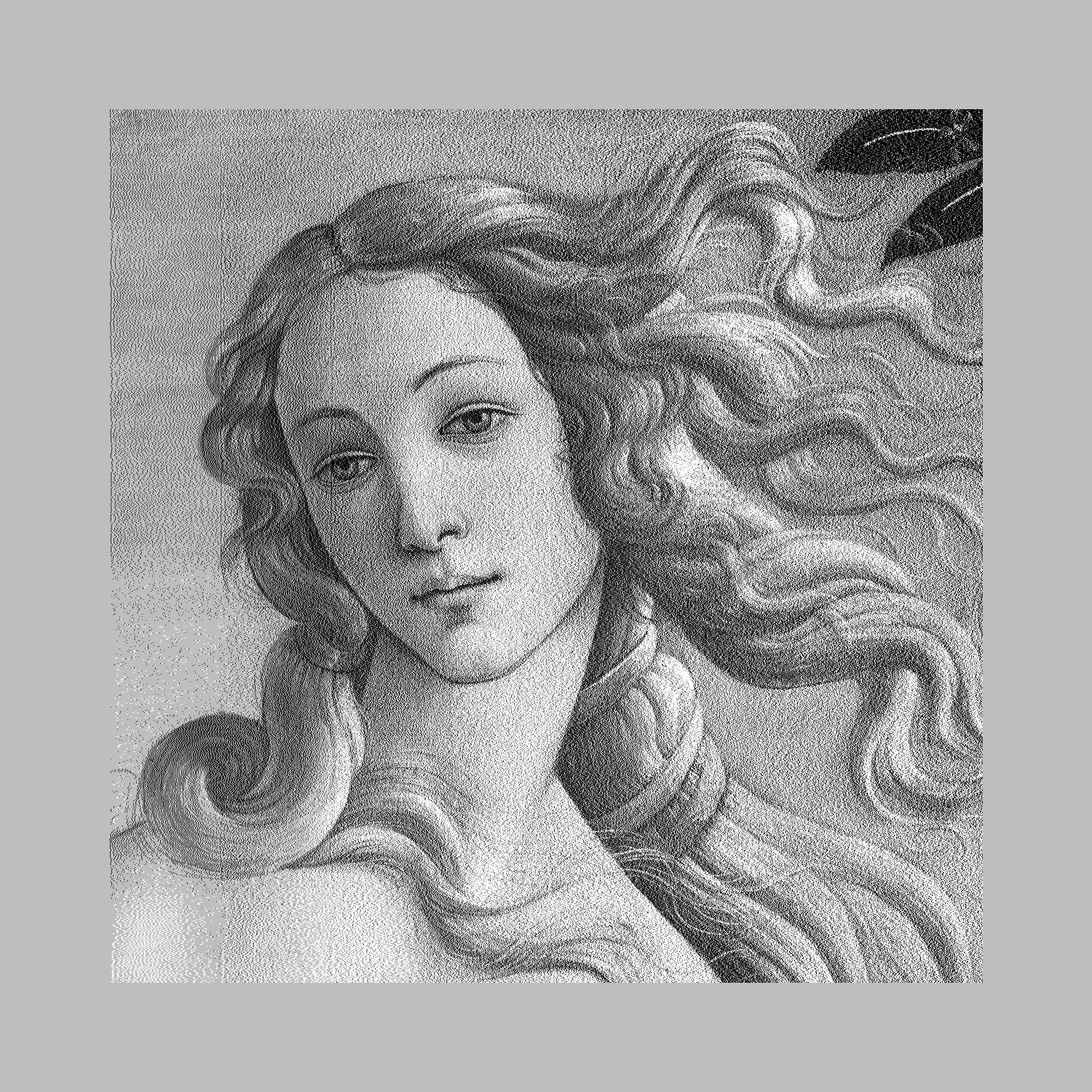
This is rather impressive. The image is noisier than before as a consequence of 8-bit quantization of the averaged values in the intermediate blurred image. Nevertheless, even with a large averaging window, fine detail — including individual strands of hair — could be recovered and is easy to discern.
Into the second dimension
One obvious problem with our blur algorithm is that it averages pixel values only in the x axis; as mentioned earlier, this roughly approximates motion blur or camera shake.
The approach we’ve developed can be trivially turned into a 2D filter by using a two-dimensional averaging window; if we use a square region, this is called box blur. That said, a more expedient and functionally similar hack is to apply the existing 1D filter in the x axis and then follow with a complementary pass in the y axis. To undo the blur, we’d then perform two recovery passes in the inverse order.
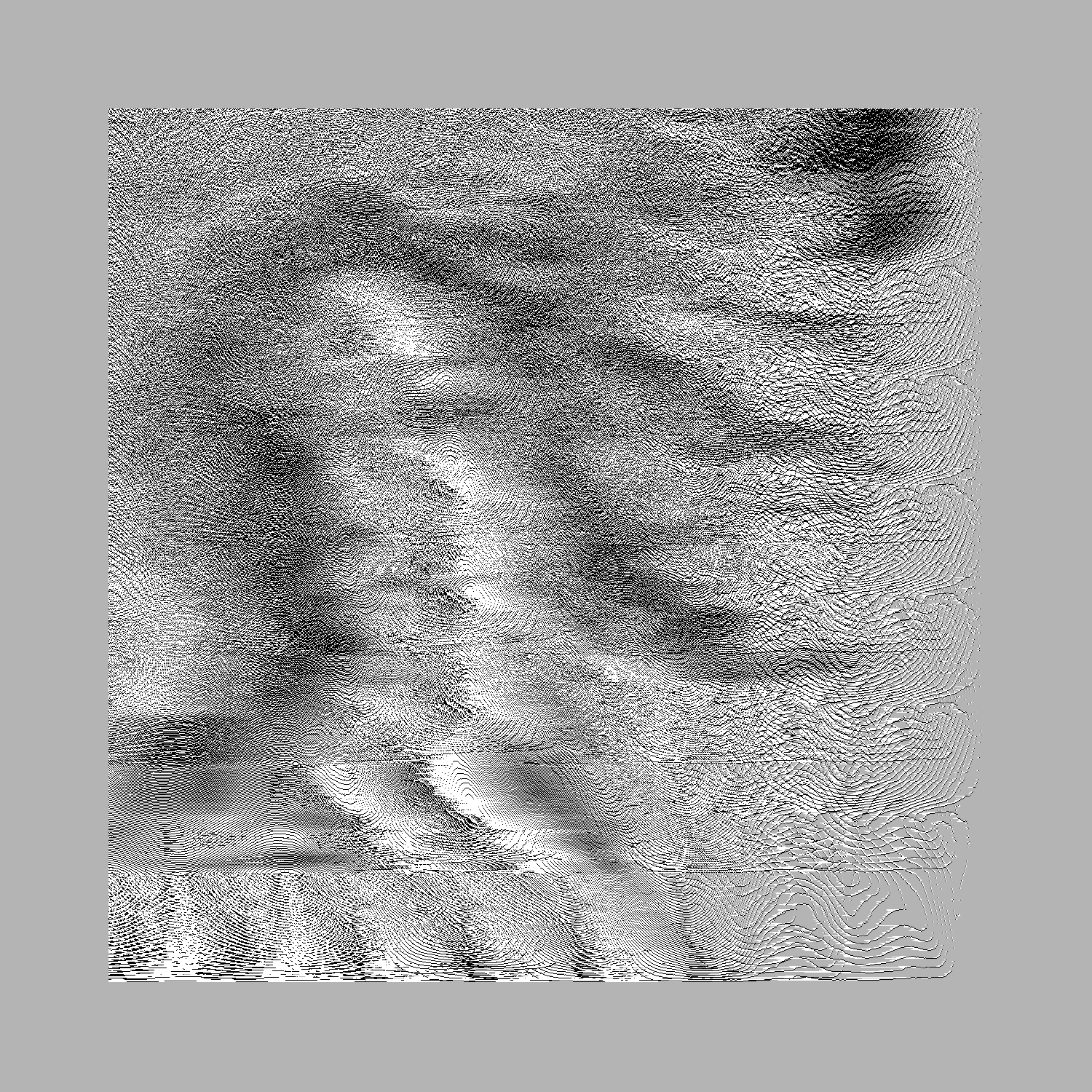
Unfortunately, whichever route we take, we’ll discover that the combined amount of averaging per pixel causes the underlying values to be quantized so severely that the reconstructed image is overwhelmed by noise unless the blur window is relatively small. For the 1D + 1D method, we get:
That said, if we wanted to develop an adversarial box blur filter, we could fix the problem by weighting the original pixel a bit more heavily in the calculated mean. For the x-then-y variant, if the averaging window has a size W and the current-pixel bias factor is B, we can write the following formula:
This filter still does what it’s supposed to do; here’s the output of an x-then-y blur for W = 200 and B = 30:
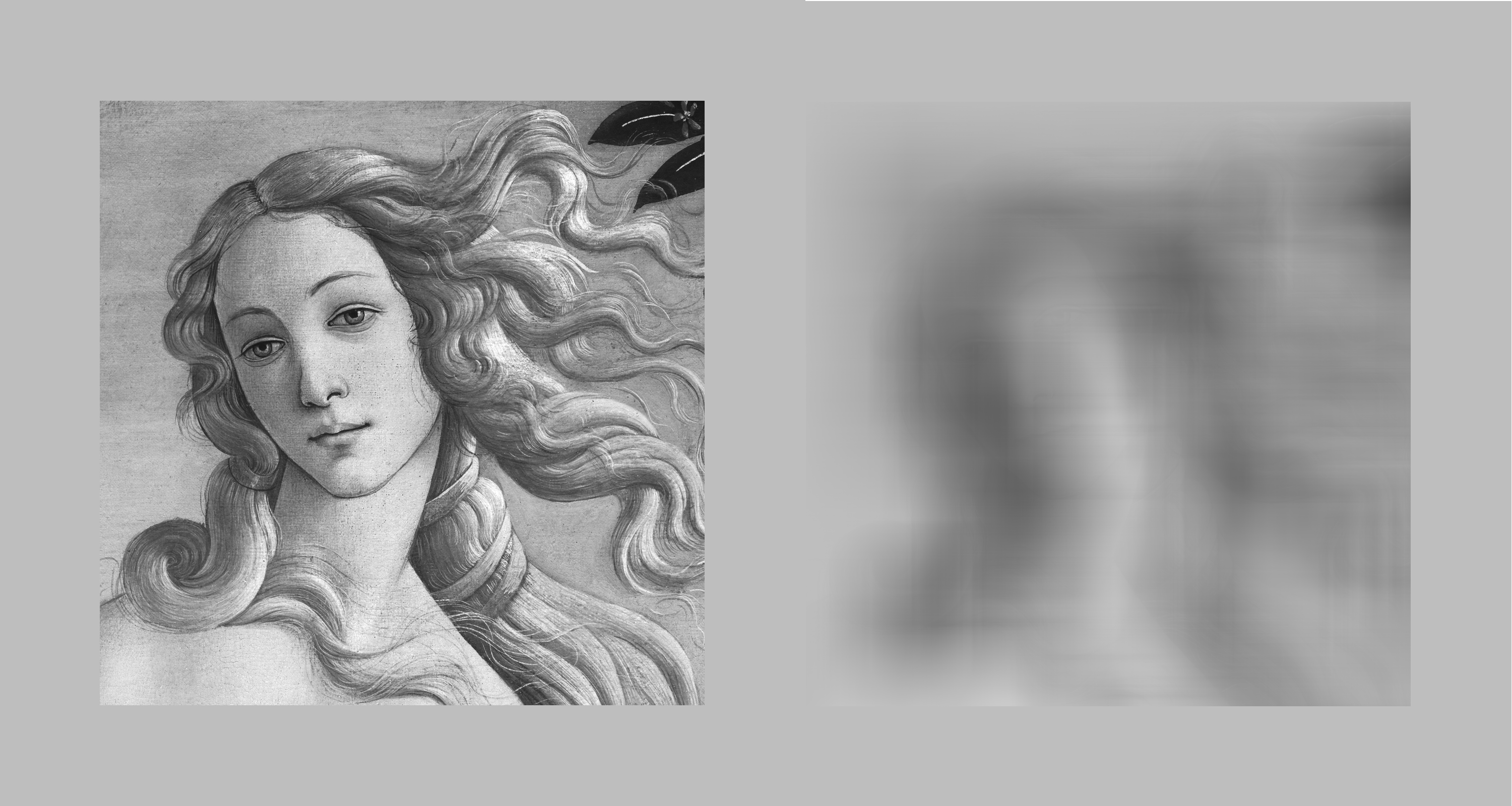
Surely, there’s no coming back from tha— COMPUTER, ENHANCE!
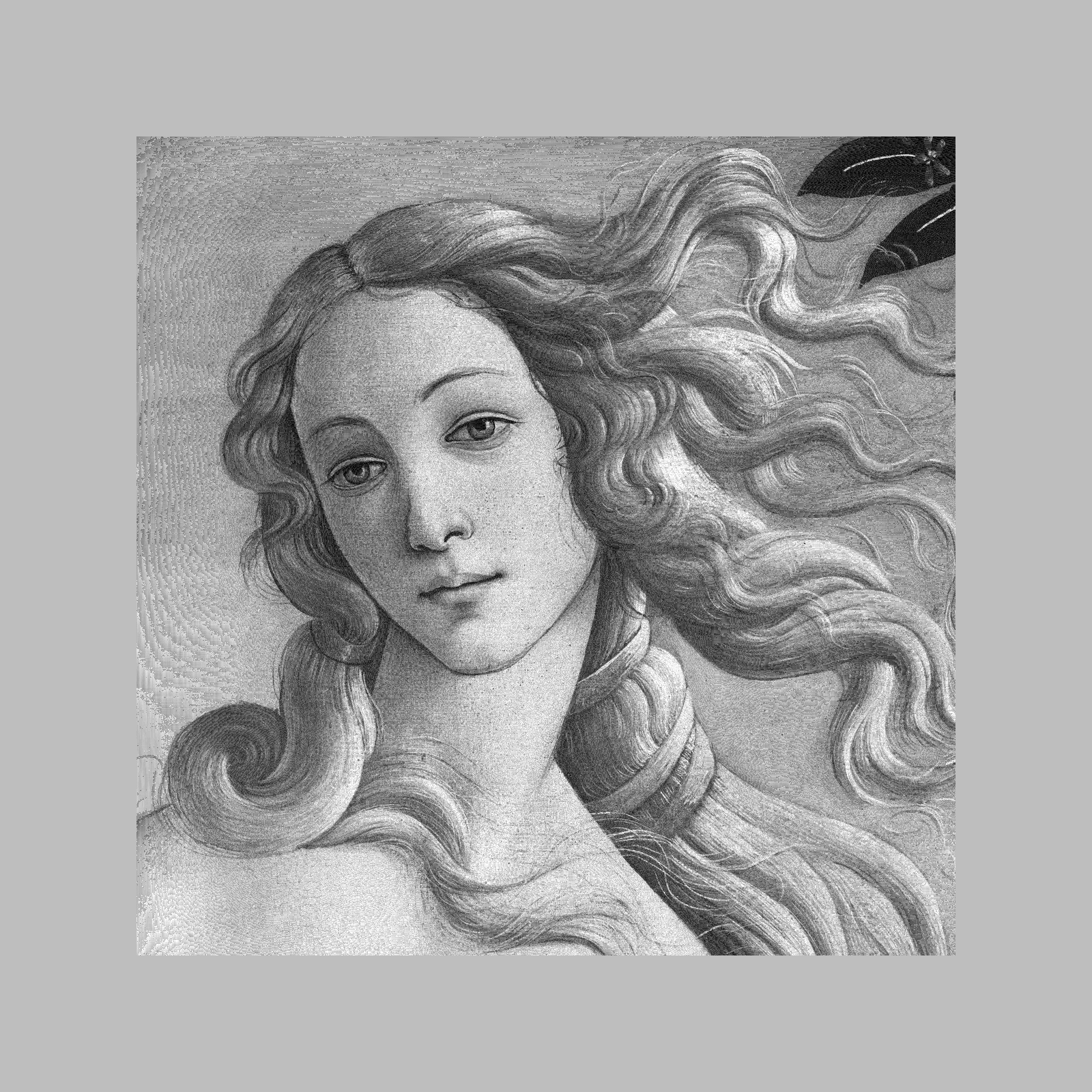
Remarkably, the information “hidden” in the blurred images survives being saved in a lossy image format. The top row shows images reconstituted from an intermediate image saved as a JPEG at 95%, 85%, and 75% quality settings:
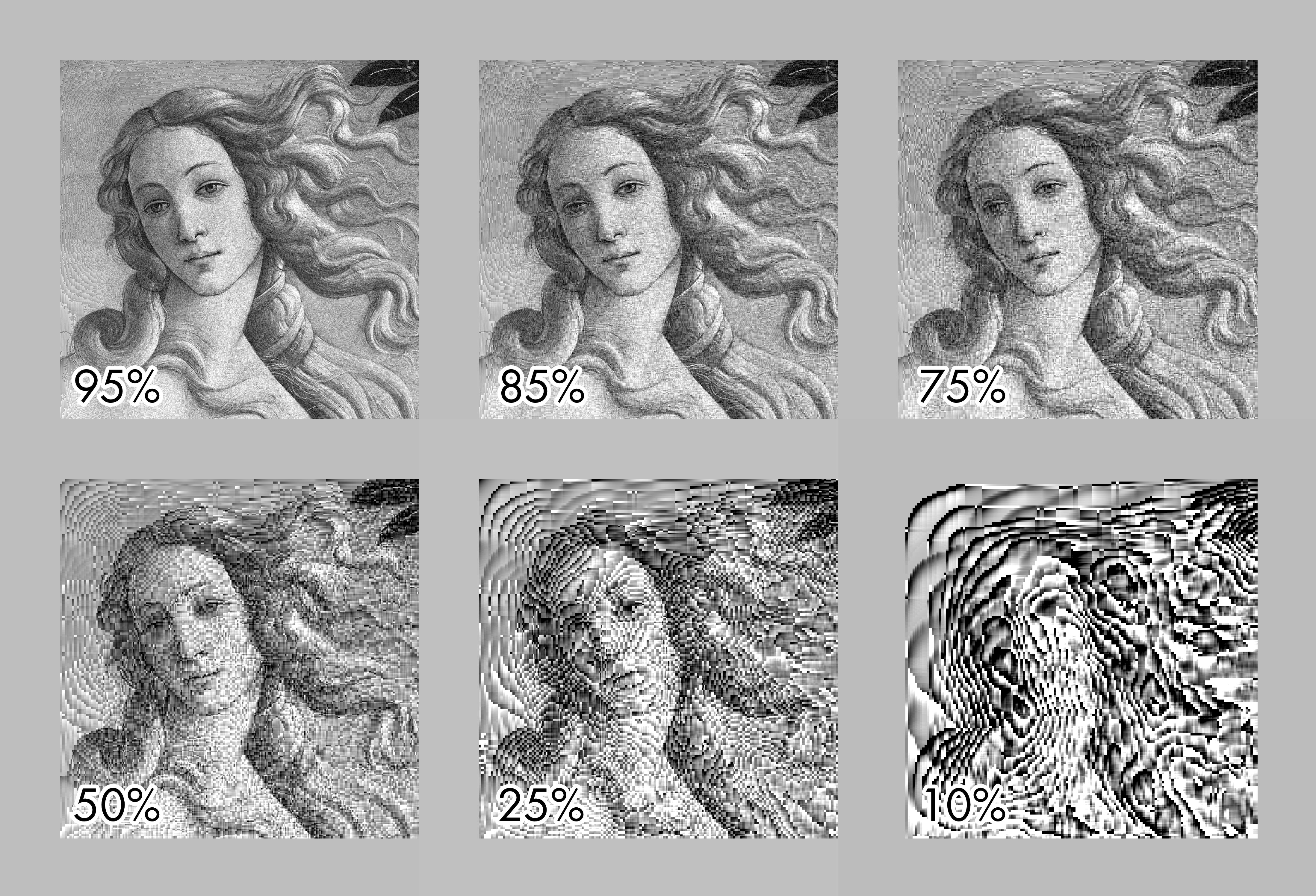
The bottom row shows less reasonable quality settings of 50% and below; at that point, the reconstructed image begins to resemble abstract art.
Do I need to worry?
Maybe? As noted earlier, even in the case of simple box blur, the recovery is less successful for large, two-dimensional blur windows, unless we tip the scales in our favor by tinkering with the algorithm.
The likelihood of success will be also reduced if you use a more sophisticated blur filter. Virtually all practical implementations of blur algorithms work in a similar way, so they leak some information due to presence of blur region boundaries and the discrete stepover of a finite averaging window. That said, they use different weighting for pixel values, which complicates the math and can make recovery borderline impossible.
On the flip side, for constrained data such as text, pixel-level reconstruction may be unnecessary to begin with. Instead, regions of the blurred image can be successively compared to the blurred representations of every possible symbol. In this scenario, it doesn’t help that the transformation is technically irreversible. It suffices that there’s a finite alphabet of shapes and that they produce distinct output images.
👉 For more articles about math, visit this page. In particular, you might enjoy:


I write well-researched, original articles about geek culture, electronic circuit design, algorithms, and more. If you like the content, please subscribe.
Some postscripts:
1) MATLAB source for the one-axis version: https://lcamtuf.coredump.cx/blog/venus.m
2) The algorithm hinges on knowing the blur method and the boundary pixel values, so it works for digital blur, but is not suitable for "analog" use cases, such as sharpening blurry photos. This is typically done with more approximate deconvolution algorithms and the results are almost never as clean.
3) For readers wondering if the centered-window case is fundamentally harder - it isn't, it's just that the formulas are a tad messier and I wanted to keep the article easy to read. Here's the visual solution for a 100-element centered window: https://lcamtuf.coredump.cx/blog/venus-centered.png . Note that this has two alternating stripe patterns, one moving left-to-right and right-to-left, each accumulating separate quantization errors.
4) If you're interested in the impact of various values of the bias parameter (B) on the 1D + 1D reconstruction, here's a quick demo: https://lcamtuf.coredump.cx/blog/venus-bias.png
Excellent as always!